The short answer
The Cyber Essentials certification requirements are the NCSC Requirements for IT Infrastructure v3.3, across five controls: firewalls, secure configuration, security update management, user access control and malware protection. They cover every in-scope device, account and cloud service. The rules most often missed: MFA on all cloud services, high and critical updates within 14 days, and no unsupported software.
On this page
A Cyber Essentials checklist lists what every in-scope device, account and cloud service must have in place before a certification body can certify you. Since 27 April 2026 the rules come from the NCSC’s Requirements for IT Infrastructure v3.3: five technical controls (firewalls, secure configuration, security update management, user access control and malware protection) applied across a scope you agree with your assessor.
Each requirement below is a check, with the evidence to have ready and the mistake that most often fails it. Work through it for every device type and cloud service: one unsupported operating system or one cloud app without MFA can be enough to fail.
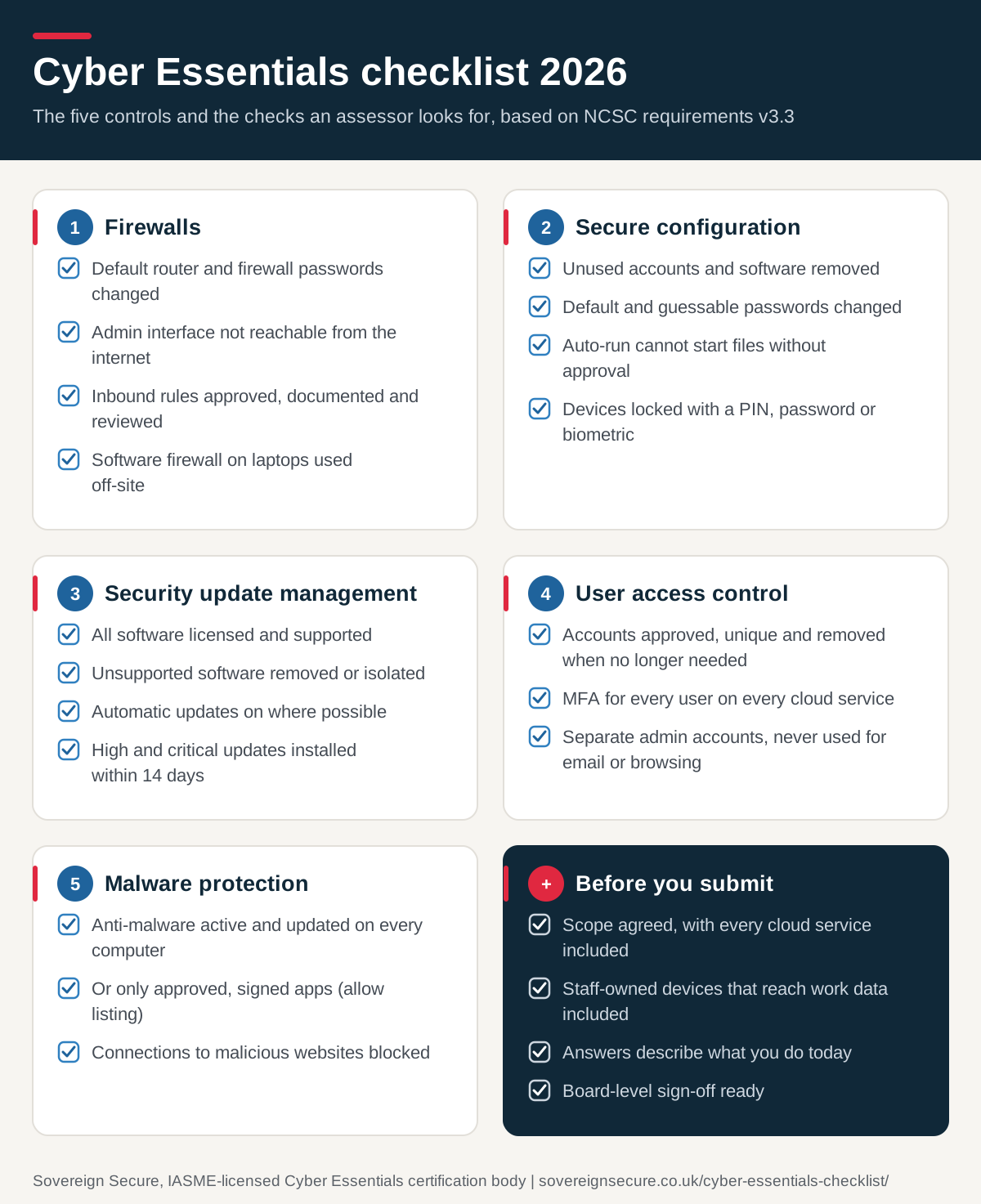
Need a Cyber Essentials checklist PDF to share with your IT provider or board? Save or print this page, with every table below, as a PDF.
What are the Cyber Essentials requirements?
The NCSC sets the requirements and IASME runs the scheme through licensed certification bodies. The current document is Requirements for IT Infrastructure v3.3, answered through IASME’s Danzell question set. This requirements table covers the five controls and the three rules applicants ask about most, with a link to the full explanation of each:
| Requirement | What it asks | The rule most often missed | Read more |
|---|---|---|---|
| Firewalls | Only secure, necessary services reachable from the internet | A software firewall on laptops used at home or on public wifi | Firewall requirements |
| Secure configuration | Remove what you don’t need and lock devices | Default passwords and unused admin accounts left in place | Secure configuration; in Microsoft 365, tenant and device settings |
| Security update management | Supported software, patched quickly | High and critical updates installed within 14 days | Security update management |
| User access control | The right people, least privilege, separate admin accounts | Leavers’ accounts still active | User access control |
| Malware protection | Stop malware from running | Protection active on every device, not most | Malware protection |
| Passwords | Minimum lengths and protection against password guessing | Short passwords on accounts without MFA | Cyber Essentials password policy |
| Multi-factor authentication (MFA) | MFA wherever it is available, and always on cloud services | MFA on email but not on other cloud apps | Cyber Essentials MFA; for Microsoft 365, MFA through security defaults or Conditional Access |
| Mobile devices | Supported, updated and locked phones and tablets that only run approved apps | Old phones that no longer receive updates | Cyber Essentials mobile device requirements |
The checks for each control, with the evidence to have ready, are in the checklist below.
What changed in April 2026 (v3.3 and Danzell)?
Assessment accounts opened from 27 April 2026 follow v3.3 and the Danzell question set, which replaced Willow (v3.2). IASME gave organisations with an assessment account opened before then six months to certify against the previous version. Most changes are clarifications, but these change results:
- MFA on cloud services is enforced. Authentication to cloud services must always use MFA, and IASME has confirmed that missing MFA where a cloud service offers it is now an automatic fail.
- 14-day patching is an automatic fail. Questions A6.4 (operating systems and router and firewall firmware) and A6.5 (applications, including associated files and extensions) fail the whole assessment if high-risk or critical updates are not installed within 14 days of release.
- Cyber Essentials Plus retests are stricter. If sampled devices fail the security update tests, the retest rechecks the original sample and also tests a new random sample. A second failure revokes the basic certificate, and your basic answers must be finalised and left unchanged before Plus testing starts.
The rest clarify rather than change the rules:
- Cloud services are now defined. v3.3 defines a cloud service as an on-demand, scalable service on shared infrastructure, reached over the internet through an account. Any service that fits and holds or processes your data is in scope. Cloud services have not been excludable since v3.0 (January 2022), so check you haven’t left any out.
- FIDO2 authenticators (passkeys) are now named as passwordless authentication and count as MFA.
- Scope no longer refers to “untrusted connections”, and backups get more emphasis (recommended, still not required).
More detail: Cyber Essentials changes 2026. For what may change next, see Cyber Essentials 2027.
Which devices and services must meet these checks?
Your scope is the whole IT infrastructure you use to run the business, or a separately managed sub-set segregated by a firewall or VLAN, agreed with your certification body before assessment. It includes end-user devices, home workers’ devices, servers and staff-owned devices (BYOD) that access organisational data or services, and every cloud service, which can never be excluded. Our Cyber Essentials scope questionnaire explains what is in and out, with the conditions for each, and helps you draw the boundary.
The Cyber Essentials checklist, control by control
Work through these five tables for every device type and cloud service in scope. Each row is one check, with the evidence to have ready and the most common failure. For why each control exists, follow the link under each heading.
Firewall checks
Every in-scope device must sit behind a correctly configured firewall: a boundary firewall or router, or a software firewall on the device when you don’t control its network. The NCSC advises using the firewall built into desktop and laptop operating systems. More on the control: firewall requirements.
| Check | Evidence to have ready | Common failure |
|---|---|---|
| Default admin password changed to a strong, unique one, or remote admin disabled | Make and model of each firewall and router | Router still on the password printed on its label |
| Admin interface not reachable from the internet, unless a documented business need exists and MFA or an IP allow list plus a managed password protects it | Remote management setting | Remote management left on by the ISP or a former IT provider |
| Unauthenticated inbound connections blocked by default | Default inbound policy | Old port forwards for CCTV or remote desktop |
| Every inbound rule approved by an authorised person and documented with its business need | Rule list with owner and reason | Nobody can explain why a rule exists |
| Rules removed or disabled when no longer needed | Date of last rule review | Rules for suppliers you stopped using |
| Software firewall on devices used on untrusted networks such as public wifi | Firewall status by device type | Firewall switched off because it “blocked something” |
Secure configuration checks
Remove what you don’t need and make sure only authenticated users get in. More on the control: secure configuration. Check regularly that:
| Check | Evidence to have ready | Common failure |
|---|---|---|
| Unnecessary accounts, such as guest and unused admin accounts, are removed or disabled | User list per device and service | Leavers’ and vendor default accounts still active |
| Default or guessable passwords are changed | Build or set-up procedure | Printers and NAS boxes on factory logins |
| Unnecessary software, utilities and network services are removed or disabled | Software inventory | Old remote-access tools left installed |
| Auto-run can’t execute files without the user’s authorisation | Group policy or MDM setting | Defaults never reviewed |
| Users are authenticated before reaching organisational data or services | Sign-in method per system | A shared login on a reception PC |
| Devices are locked with a biometric, password or PIN, with brute-force protection | Lock-screen and lock-out policy | Tablets with no PIN |
Brute-force protection means throttling to no more than 10 guesses in 5 minutes, or locking after no more than 10 failed attempts; where the vendor doesn’t allow either, its default is accepted. A PIN or password that only unlocks the device needs at least 6 characters. If it also signs the user in to services, the full password rules apply.
Security update checks
All software on in-scope devices must be licensed and supported, and high-risk or critical updates must be installed within 14 days of release. Software includes operating systems, off-the-shelf applications, extensions, interpreters, scripts, libraries, network software, and firewall and router firmware. More on the control: security update management.
| Check | Evidence to have ready | Common failure |
|---|---|---|
| All software licensed and supported, so it still receives vendor security updates | OS and software inventory with versions | An old OS, or a phone that no longer gets updates |
| Unsupported software removed, or moved to a sub-set with no internet traffic | Decommissioning record or network diagram | One legacy PC kept “for a single application” |
| Automatic updates on where possible | Update policy per platform | Updates deferred indefinitely |
| Critical and high-risk updates installed within 14 days | Patch reports showing install dates | Windows patched, but firmware and third-party apps missed |
An update falls under the 14-day rule if the vendor calls it critical or high risk, if it fixes a vulnerability with a CVSS v3 base score of 7 or above, or if the vendor gives no severity. If one update bundles mixed-severity fixes and any is high or critical, the whole update is due within 14 days. The NCSC recommends, but doesn’t require, installing every update within 14 days.
User access control checks
You must control who has an account and what it can reach, including accounts your IT provider or MSP uses. More on the control: user access control.
| Check | Evidence to have ready | Common failure |
|---|---|---|
| A process to create and approve user accounts | Joiner form or ticket | Accounts created with no approval |
| Unique credentials for every user | Account list | Shared “office” or “admin” logins |
| Accounts removed or disabled when no longer needed | Leaver process and last review date | Former staff still active in Microsoft 365 |
| MFA wherever available, and always on cloud services | MFA enforcement report per service | MFA on email but not on the HR or file-sharing app |
| Separate admin accounts, never used for email or browsing | List of admin accounts and owners | The IT lead’s everyday account is a global admin |
| Special privileges removed when no longer needed | Role-change process | Admin rights kept after a move of team |
Passwords and MFA each have their own guide. Our password policy guide sets out the full password rules, and our guide to multi-factor authentication explains which accounts need it and which factors count.
Malware protection checks
A malware protection mechanism must be active and kept up to date on every in-scope device, using at least one of two options. More on the control: malware protection.
| Option | Where it can be used | It must |
|---|---|---|
| Anti-malware software | Windows and macOS devices, including servers | Update in line with the vendor; stop malware and malicious code running; block connections to malicious websites |
| Application allow listing | Any in-scope device | Allow only approved, code-signed apps; approve apps before deployment; keep a current list; stop users installing unsigned apps |
Typically, computers run anti-malware and phones and tablets use allow listing through device management. Common failures: protection off on a server, web protection disabled, and staff installing unapproved apps.
How to use this Cyber Essentials checklist
- Agree your scope and list every device type, operating system version, cloud service and admin account.
- Work through the five control tables and fix gaps first. Turning on MFA takes days; replacing unsupported hardware can take weeks.
- Preview the questions on our Cyber Essentials questionnaire page and prepare answers offline.
- Complete the self-assessment in the IASME portal. Your certification body’s assessor marks it, and you fix and resubmit anything flagged.
- Get certified. The certificate is valid for 12 months. If a customer needs independent testing, the Cyber Essentials Plus requirements add a technical audit of the same five controls.
- Write the rules down. Adopt our free cyber security policy template so the controls stay in place between renewals, and use our map of the NCSC 10 Steps to Cyber Security for the areas beyond the five controls.
Why use Sovereign Secure for Cyber Essentials?
Sovereign Secure Ltd is an IASME-licensed certification body that issues Cyber Essentials and Cyber Essentials Plus certificates. We are ISO 27001 certified, a PCI SSC Qualified Security Assessor (QSA) company and a member of the PCI SSC Global Executive Assessor Roundtable for 2026-2028.
Every Cyber Essentials certification package includes a pre-assessment check, a support call of up to an hour, guide access and the certification fee. Packages start at £320 + VAT, and Gold includes assessment within one working day (24 hours) and unlimited resubmissions.
Ready to certify?
If every row above is a tick, choose a package on our Cyber Essentials cost page. Not sure? Our free Cyber Essentials readiness check scores you against the same v3.3 rules in about five minutes. Still checking whether a customer requires it? See do I need Cyber Essentials in our Cyber Essentials FAQs. If you found gaps you can’t close alone, our Cyber Essentials consultancy team can help you close them before you submit. Or call +44 161 523 5276 to talk it through with an assessor.
Your next step
- Readiness checkAnswer 20 questions for a readiness score and a fix list before you apply.Start the free check
- Cyber Essentials pricesPackages for every company size, from £320 + VAT.See CE prices
- Get a CE+ quoteTell us about your devices and cloud services for a Cyber Essentials Plus quote.Get a CE+ quote
Last reviewed October 2026 by the Sovereign Secure assessment team.