The short answer
Spear phishing is a targeted phishing attack aimed at a specific person, role or organisation: that is the spear phishing meaning, one chosen target rather than thousands. The attacker researches the target, then sends a message mentioning real colleagues, suppliers or projects so it looks routine, usually to steal a password, install malware or redirect a payment.
On this page
Spear phishing is a phishing attack aimed at a particular person, role or organisation rather than thousands of strangers. The attacker researches the target first, using company websites, social media and press releases, then writes a message that fits the target’s real work. Because it looks routine, it gets past filters and suspicion more often than bulk phishing.
It is one branch of the wider phishing family, and a common first step in invoice fraud, account takeover and network intrusions.
What is spear phishing?
Spear phishing is targeted phishing: a deceptive message, usually an email but sometimes a text, call or chat message, written for a specific recipient. The spear phishing meaning comes from fishing: bulk phishing casts a wide net, while a spear is aimed at one fish. Most messages try to make the recipient:
- enter their password on a fake sign-in page, often a copy of Microsoft 365 or another cloud service
- open an attachment or link that installs malware
- change bank details, pay an invoice or send data, with no malware involved at all
What is the difference between phishing, spear phishing and whaling?
The difference is how narrowly the attacker aims. Phishing is sent in bulk with generic lures, spear phishing is researched and aimed at chosen people, and whaling is spear phishing aimed at senior executives.
| Aspect | Phishing | Spear phishing | Whaling |
|---|---|---|---|
| Target | Anyone with an email address | A named person, role or team | Directors, partners and senior executives |
| Research | Little or none | Names, suppliers, projects, writing style | As spear phishing, plus public filings and personal details |
| Typical lure | Parcel delivery, locked account, prize | Invoice, HR document, file shared by a known colleague | Urgent confidential payment, legal matter, board paper |
| Typical goal | Credentials or malware at scale | Credentials, a foothold or a payment | Large payments or sensitive data |
When the attacker writes from a compromised or look-alike supplier or executive mailbox and asks for money, it is usually called business email compromise. Spear phishing is often how that mailbox was taken over.
What does a spear phishing attack look like?
These examples are illustrative but follow well-known patterns.
Finance. An accounts payable clerk gets a reply in an existing thread, apparently from a regular supplier, saying it has changed banks. The next payment goes to the attacker. This is what that email can look like:
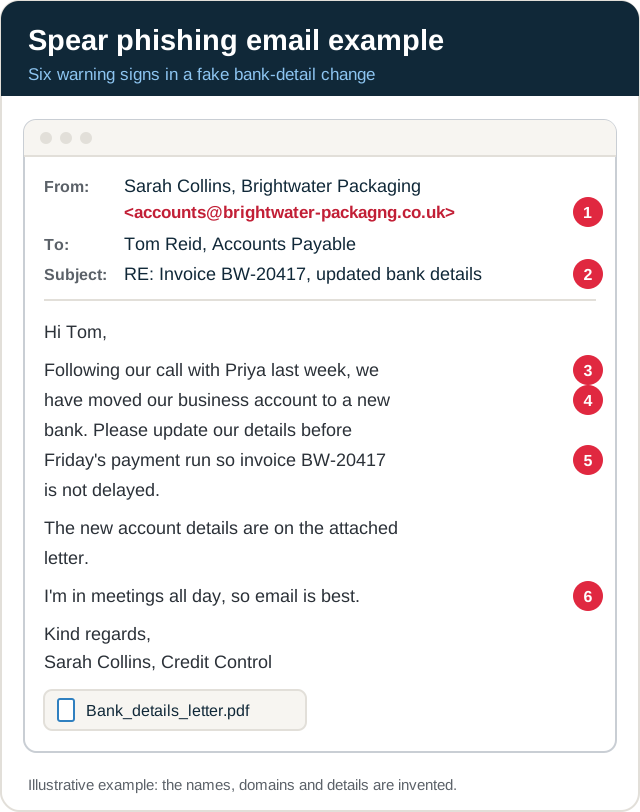
- Look-alike domain. One letter is missing from the supplier’s real address, which is easy to miss on a phone.
- A real thread. The attacker replies under a genuine invoice number, often from a mailbox compromised earlier or copied from a forwarded email.
- Researched detail. Naming a real colleague and a recent call makes the request feel routine.
- The ask. A change of bank details is the point of the whole message.
- Pressure tied to a real process. The deadline is your own payment run, so delay feels like your fault.
- No call-back. “Email is best” discourages the one check that stops the fraud: a call to a number you already hold.
HR. An employee is sent a “revised salary review” or “updated holiday policy” link that opens a fake Microsoft 365 sign-in page. The captured password, and sometimes the one-time code typed alongside it, gives the attacker the mailbox.
Supplier and IT. A message apparently from your IT provider asks an administrator to install an urgent update or approve a remote support session. The same pretext is often delivered by phone, which is vishing.
How do you defend against spear phishing?
Assume a well-researched message will reach someone and look genuine, so protect the processes it targets as well as the inbox. On top of the usual anti-phishing layers, such as filtering and easy reporting:
- Verify payment and bank-detail changes out of band. Call the supplier on a number you already hold, never one in the email, and require a second approver for new payees.
- Give high-risk roles phishing-resistant sign-in first. Passkeys or FIDO2 security keys for finance, executives and IT administrators, because a fake sign-in page can capture a password and a one-time code together.
- Watch for look-alikes. Monitor for domains imitating yours and your main suppliers’, tag external email, and enforce DMARC at quarantine or reject so your exact domain is hard to spoof.
- Limit what attackers can learn from public staff lists, org charts and supplier announcements.
- Train by role. Finance, HR, executive assistants and IT administrators need scenarios that match their work, and a one-click way to report. Our guide on how to spot phishing emails gives everyone else ten warning signs and five annotated examples.
If a targeted message does get through, report it through your organisation’s report button or process straight away. For routes outside work, see how to report phishing in the UK.
The NCSC’s phishing guidance sets out the full layered approach. Many of these controls are Microsoft 365 settings, which a Microsoft 365 security assessment checks.
How does a targeted phishing simulation work?
A targeted simulation tests your spear phishing defences the way an attacker would, but with written approval and agreed limits:
- Agree scope and rules: which roles are in scope, who knows, and which lures are off limits, such as redundancy or health scares.
- Research: the tester gathers public information about the chosen roles, as an attacker would.
- Build the pretext: look-alike domains, landing pages and messages tailored to each target group.
- Run and measure: clicks, credentials entered, whether a fake bank-detail change was checked by call-back, and how quickly people reported it and the security team responded.
- Report: results by team rather than by name, with the technical and process gaps found.
Bulk phishing simulation measures baseline awareness across everyone. Targeted scenarios show whether your highest-risk roles and payment processes hold up. Both sit within social engineering testing.
Why Sovereign Secure
Sovereign Secure runs spear phishing scenarios, including executive, finance and invoice fraud pretexts, as part of social engineering testing. We are a PCI SSC-approved QSA company and, as an ISO 27001-certified firm, we handle campaign data securely. For related terms, see the cyber security glossary.
Next step: to find out how your finance, HR and executive teams respond to a targeted attack, request a penetration testing quote and tell us which roles and processes worry you most.
Your next step
- Phishing simulationRealistic email, QR code and vishing campaigns, reported by team rather than by name.See phishing simulation
- Social engineeringPhishing, phone and on-site pretext tests that show how your staff respond.See how we test
- Scope your testChoose your channels online to scope a phishing or social engineering test.Scope your test
Last reviewed October 2026 by the Sovereign Secure assessment team.