
On this page
- What is Active Directory penetration testing?
- Why is Active Directory the main target in an internal test?
- What are the most common Active Directory attack paths?
- How does a tester chain these into domain compromise?
- What is an Active Directory security assessment?
- What about hybrid Active Directory and Entra ID?
- How do you scope an Active Directory penetration test?
- Which fixes close the most attack paths?
- Does PCI DSS or ISO 27001 require Active Directory testing?
- Why Sovereign Secure
- Next step
Active Directory penetration testing is a manual, authorised test that starts from an ordinary domain user account and tries to reach Domain Admin, or equivalent control of the domain, the way a real attacker would after phishing one employee. The most common attack paths are captured or relayed password hashes, Kerberoasting, reused local administrator passwords, over-generous permissions and misconfigured certificate templates. Most of them are closed by configuration changes rather than new products.
This guide explains each attack path, shows how testers chain them, and sets out the fixes that close the most routes.
Key takeaways
- Any authenticated user can read most of Active Directory, so one phished account is enough to start mapping attack paths.
- The common routes to Domain Admin are misconfigurations, not exotic exploits.
- Findings that look low or medium on their own often combine into full domain compromise.
- Grey-box testing from a standard user account usually gives the best value.
- Treat domain controllers, AD Certificate Services and identity sync servers as your most sensitive assets.
What is Active Directory penetration testing?
Active Directory penetration testing is the part of an internal penetration testing engagement that targets your domain: users, groups, computers, permissions, Group Policy, Kerberos and certificate services. It measures one thing above all: how far a standard user can get.
It differs from a vulnerability scan. A scanner reports missing patches host by host. A tester looks at the relationships between accounts, machines and permissions, which is where most AD attack paths live, and proves which ones work. Our comparison of penetration testing vs vulnerability scanning explains why you need both.
Why is Active Directory the main target in an internal test?
Because it controls access to almost everything else. Whoever controls the domain can log on to servers, read file shares, push software through Group Policy and reach backups. An attacker who lands on one workstation, through phishing or a stolen password, will usually head for AD first.
It is also readable by default. Any authenticated user can query users, groups, group memberships, service accounts and many permissions. Testers use the same graph-mapping tools attackers use to turn that data into a map of routes to privileged groups.
What are the most common Active Directory attack paths?
These are the routes testers find again and again. None needs a zero-day vulnerability.
| Attack path | What it exploits | How the tester proves it | Main fix |
|---|---|---|---|
| LLMNR and NBT-NS poisoning | Legacy name resolution left on by default | Captures password hashes as machines look for resources, then cracks or relays them | Disable LLMNR and NBT-NS by Group Policy |
| NTLM relay | SMB or LDAP signing not enforced; NTLM still widely allowed | Relays a captured authentication to another server to act as that user | Require SMB signing, LDAP signing and channel binding; reduce NTLM |
| Kerberoasting | Service accounts with weak passwords and a service principal name | Requests service tickets as a normal user and cracks them offline | Group managed service accounts, or long random passwords |
| AS-REP roasting | Accounts set not to require Kerberos pre-authentication | Requests data for those accounts and cracks it offline | Remove the setting from every account |
| Password spraying | Common or seasonal passwords | Tries one likely password across many accounts, below the lockout threshold | Banned-password lists, MFA, alerting on spray patterns |
| Credentials in shares and scripts | Passwords in SYSVOL, logon scripts, file shares and old Group Policy Preferences | Searches readable locations for stored credentials | Remove them, rotate the passwords, use a secrets vault |
| Local admin password reuse | The same local administrator password on many machines | Uses one captured hash to log on across the estate | Windows LAPS for unique, rotating passwords |
| Excessive permissions (ACLs) | Rights such as reset password, write members or full control granted too widely | Follows a chain of permissions to a privileged group | Review delegations; tiered administration |
| Unsafe delegation | Unconstrained or misconfigured Kerberos delegation | Captures or impersonates privileged accounts through a delegated server | Remove unconstrained delegation; mark admins “sensitive and cannot be delegated” |
| AD Certificate Services misconfiguration | Templates that let users request certificates for other identities | Requests a certificate as a Domain Admin and authenticates with it | Review templates, enrolment rights and web enrolment settings |
What is Kerberoasting?
Kerberoasting is an attack in which any domain user requests Kerberos service tickets for accounts that have a service principal name (SPN), then cracks the part of each ticket that is encrypted with a key derived from the service account’s password. The cracking happens offline, so no lockout or failed logon is ever recorded, and it succeeds when service accounts have short, human-chosen passwords that rarely change, which is common because changing them can break applications.
The fix is to move service accounts to group Managed Service Accounts (gMSAs), whose long random passwords Windows rotates automatically, or to give every remaining service account a long random password (we suggest at least 25 characters). Then allow only AES encryption for Kerberos on those accounts, remove SPNs nobody uses, and alert on bursts of service ticket requests, especially any that ask for the older RC4 encryption.
How does a tester chain these into domain compromise?
By combining small weaknesses that a scanner would report separately, or not at all. An illustrative chain, of the kind a good report tells as an attack narrative:
- From a standard user laptop, the tester captures a password hash through LLMNR poisoning and cracks a weak password.
- That user can read a file share holding a script with a service account password in it.
- The service account is a local administrator on several servers, and one of those servers has a Domain Admin session.
- The tester extracts the Domain Admin’s credentials from that server and demonstrates control of the domain safely, without changing production data.
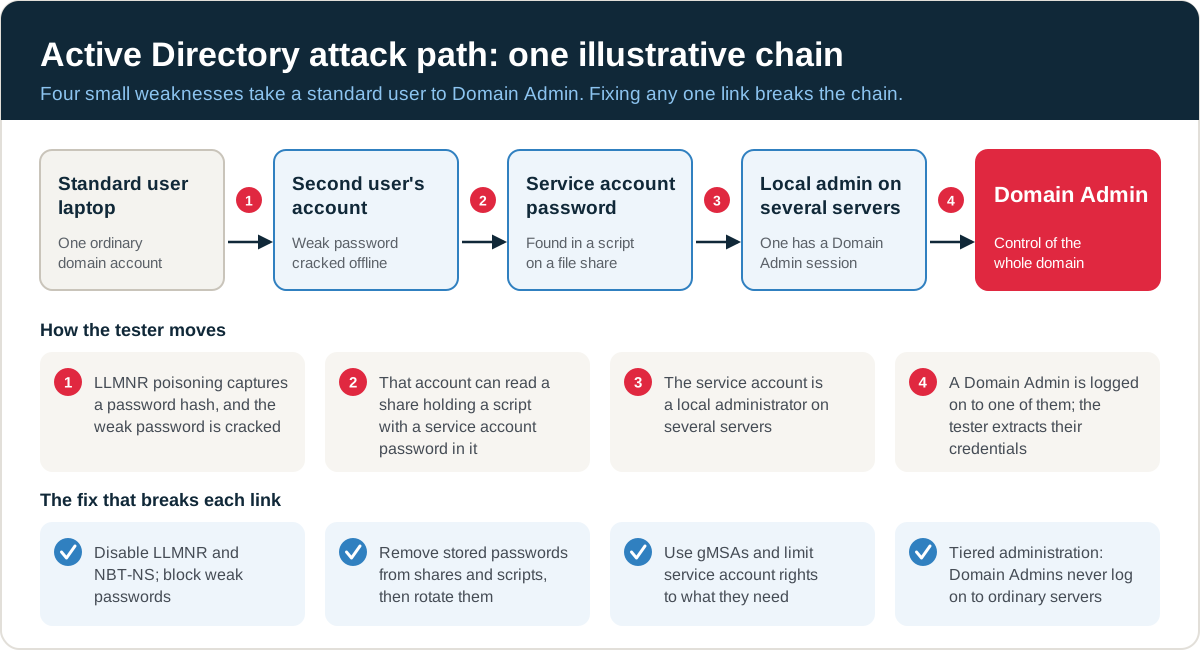
Each step on its own might be rated low or medium. Together they give an attacker the whole estate. That is why AD findings should be read as paths, and why fixing any one link breaks the chain. Our guide to reading a penetration testing report explains how attack narratives should be presented.
What is an Active Directory security assessment?
An Active Directory security assessment is a configuration review of the domain: privileged group membership, delegations, password and lockout policy, stale accounts, trusts, Group Policy and certificate templates. It is usually done with read-only access and gives broad coverage.
| Aspect | AD security assessment | AD penetration test |
|---|---|---|
| Starting point | Read-only or administrative access | A standard user account, or network access only |
| Method | Configuration and permission review | Safe exploitation of real attack paths |
| Output | List of weaknesses against good practice | Proven attack paths, plus weaknesses found on the way |
| Best for | Hardening programmes and baselining | Showing real-world impact and prioritising fixes |
The two work well together: the assessment finds breadth, and the test proves which weaknesses matter most.
What about hybrid Active Directory and Entra ID?
Most organisations now sync on-premises AD with Microsoft Entra ID. That creates new paths in both directions. The server that runs directory synchronisation holds highly privileged credentials and should be protected like a domain controller. Accounts that are privileged in both environments, weak conditional access, and legacy authentication left enabled in the cloud tenant can all turn an on-premises foothold into cloud access, or the reverse.
If your identity estate is hybrid, scope the cloud side too. Our Azure penetration testing covers Entra ID, role assignments and hybrid identity paths, and cloud penetration testing covers Microsoft 365 and other clouds alongside the on-premises test.
How do you scope an Active Directory penetration test?
Scope an Active Directory pentest by the number of domains, forests and trusts, the size of the user and computer estate, and whether AD Certificate Services and hybrid identity are included. Then agree:
- Starting position. Grey box (a standard user account and a normal laptop build) mirrors a phished user and usually gives the best value. Black box (network access only) adds realism but spends time on discovery.
- Objectives. For example Domain Admin, access to the finance system, or reaching the backup servers.
- Rules of engagement. Password-guessing limits below your lockout threshold, no denial of service, and agreement before any change to directory objects.
- Detection. Whether your security operations team is told, which decides whether you are also testing detection and response.
Our checklist on how to prepare for a penetration test covers the practical set-up, including remote testing appliances.
Which fixes close the most attack paths?
A handful of changes remove a large share of the routes in the table above:
- Disable LLMNR and NBT-NS, and enforce SMB signing and LDAP signing.
- Deploy Windows LAPS so every machine has a unique local administrator password.
- Move service accounts to group managed service accounts, or give them long random passwords.
- Put privileged accounts in the Protected Users group and adopt tiered administration, so Domain Admins never log on to ordinary workstations and servers.
- Review permissions on privileged groups and organisational units, and remove unconstrained delegation.
- Audit AD Certificate Services templates and enrolment rights.
- Remove stored credentials from shares and scripts, then rotate every password that was exposed.
Then retest. Our guide to penetration test remediation covers prioritising and verifying fixes.
Does PCI DSS or ISO 27001 require Active Directory testing?
Neither names Active Directory, but both usually catch it.
- PCI DSS v4.0.1. If AD authenticates users to systems in the cardholder data environment, it is normally in scope as a connected system, so it falls within the internal penetration testing required at least every 12 months and after significant change under Requirement 11.4.2. Segmentation testing under 11.4.5 (and 11.4.6 for service providers) matters too, because domain trust often crosses network boundaries. PCI DSS penetration testing should cover it.
- ISO/IEC 27001:2022. AD testing gives evidence for Annex A controls 8.2 (privileged access rights), 8.5 (secure authentication) and 8.8 (management of technical vulnerabilities). See ISO 27001 penetration testing.
- Cyber Essentials. The user access control requirements expect separate administrator accounts and controlled privileges, which an AD test checks in practice.
The NCSC’s penetration testing guidance explains how to get value from any internal test, including agreeing scope and handling findings.
Why Sovereign Secure
Sovereign Secure is a PCI SSC Qualified Security Assessor (QSA) company, an IASME-licensed Cyber Essentials certification body and ISO 27001 certified. We write Active Directory findings as attack paths with the fix for each link, so your team can see which change breaks the chain, and the report can go to your assessor or auditor as evidence.
Next step
Active Directory testing works best alongside a test of your perimeter; our comparison of internal vs external penetration testing explains how the two fit together, and our infrastructure penetration testing service covers both. Tell us how many domains, users and sites you have, and our penetration testing quote form will turn that into a fixed price.
Free tools and services
- Scope your testChoose your test types and asset counts online to scope your penetration test.Scope your test
- Pen testing cost guideUK day rates, price ranges by test type and what drives the cost.Read the cost guide
- Talk to a testerTell us what you need tested. We aim to reply within one working day.Talk to a tester